
PayWeb360 v1.21 is now available in production. The purpose of this release is to introduce 1 new feature (Split Payment), make 3 enhancements (Balance Presentment, Payments-in-full, User Events) and fix 3 bugs (Convenience Fees, Email Registration, Packet Accounts).
Split Payment
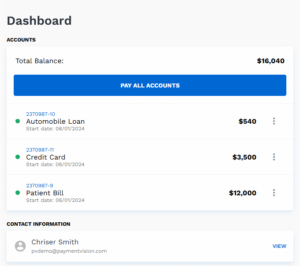
Prior to this release, PayWeb360 could be configured to allow payments at the packet or individual account level but not both. Now PayWeb360 can be configured to allow both through a new Linked Account mode (Split Payment).
How it Works
- When in Split Payment mode, a Pay all Accounts button is presented on the Dashboard enabling a user to direct a payment to the entire packet balance.

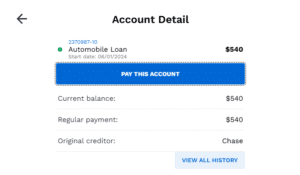
- When a customer clicks an individual account, a Pay this Account button is presented enabling a user to direct a payment to an individual account.

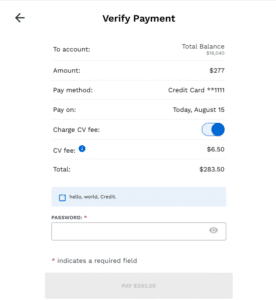
- When paying all accounts, the Pay To field is populated with “Total Balance” on both the Verify Payment screen and receipt.

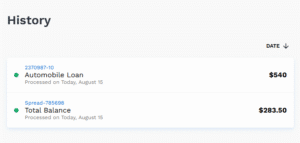
- When paying all accounts, the Account Reference Code field is populated with “Spread-“{MasterAccountID}”.

Limitation
As is the case with Packet mode, accounts with different payees are not supported in Split Payment mode. Users will not be able to login when accounts have different payees.
Balance Presentment
Balance Presentment is an existing feature that enables clients to present the principal balance and other balances such as past due and late fees. In this release, we are adding CPI (Collateral Protection Insurance) as another option.
Payments-in-full
Prior to this release, settlement and payment-in-full options shared the same labels, making it impractical to offer both within a single PayWeb360 site. They can now be separately labeled.
User Events
User Events is an existing feature that records a user’s actions and the results during a PayWeb360 session. Now we have a more direct way to trace a user event to a customer reference code and associate it with a session. While this has no immediate client impact, it lays the tracks for future reporting enhancements and insights into the user journey.
Convenience Fees
We fixed an issue causing the convenience fee to disappear after navigating away from the Verify Payment screen.
Email Registration
In our last release, we added the ability to configure PayWeb360 to require new users to register an email address. In this release, we fixed a known issue that required users to register an email address even if they had already onboarded.
Packet Accounts
We fixed an issue causing an account reference code to be presented in the pay to field, as opposed to “Total Balance”, when paying an entire packet balance.
Known Issues
The following issues were deemed to be non-critical, and we intend to fix them in our next release.
| Slit Payment |
Note: The following 2 issues only impact PayWeb360 sites that are configured to allow users to cancel their own payment plans.
|
| Settlement Offers |
|
| Email Registration |
|