
PaymentVision 5.33 is now available in production. The purpose of this release is to introduce 1 new feature (API Links) and 1 new pilot program (Digital Wallet API).
API Links
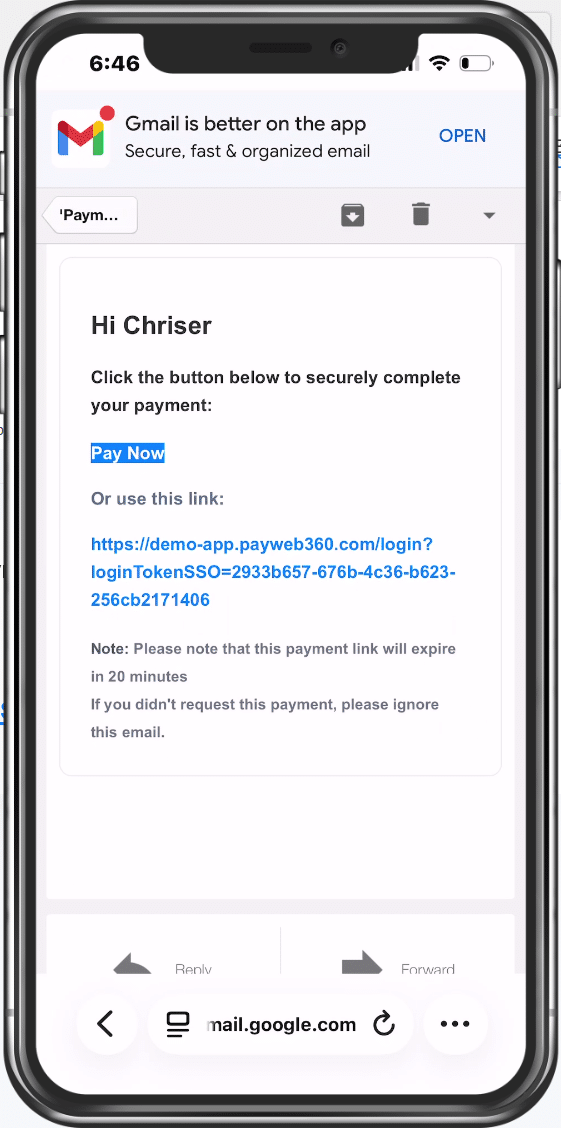
API Links is a new feature of PayAPI that enables a third-party application to send or retrieve a PayWeb360 payment link.
Request Methods
| Request Method | Description |
| CreatePaymentLink | Send or retrieve a one-time payment link |
| SendMakePaymentPlanLink | Send a payment plan link |
Use Cases
- Remove an application from PCI compliance scope
- Remove an agent from PCI compliance scope
- Reduce Safeguards Rule compliance scope
- Automate payment workflows
- Simplify payment integration using pre-built components
How it Works
- Create – A link can either be retrieved and embedded or sent via email or SMS.

- Access – A verified destination provides one-click access. For security, links are single-use and expire in 20 minutes.
- Verify – An unverified destination requires an authentication code, which verifies the destination for future communications.
- Select – Users select an existing payment method or add a new one. These options are configurable at the payee level and can be further restricted as part of the request.

- Pay – After selecting an option, users verify and authorize the payment.

- Success – A successful payment results in either a confirmation or return to your site.



Payment Methods
| Request Method | Payment Methods |
| CreatePaymentLink |
|
| SendMakePaymentPlanLink |
|
Digital Wallet API
Digital Wallet is an existing feature of PayWeb360 that enables users to pay using Apple Pay or Google Pay. In this release, we are exposing it to third-party applications as part of a pilot program. Once we gain operational experience, we will make it available to others.