
PaymentVision 5.34 is now available in production. The purpose of this release is to introduce the next generation of our agent-facing payment application (PayAgent 3), enhance an existing feature (API Links) and resolve an issue (Portal Login).
PayAgent 3
PayAgent 3 is a new mode within the PaymentVision Portal that enables a user to launch an agent view of PayWeb360.
How it works
- PayAgent 3 is launched via Customer Search. Like PayAgent 2, it is launched by clicking on the View Accounts action.

- If the customer only has one account, clicking View Accounts triggers a single sign-on into PayWeb360, launching its agent configuration.

- If the customer has multiple accounts, clicking View Accounts launches a Customer Accounts screen with a Make Payment action that triggers the single sign-on.

PayAgent Comparison
PayAgent 2 PayAgent 3 One-time payments √ √ Payment plans √ √ Settlement offers √ Stipulations √ Payment links √


Known Issue
The debt disclosure, when enabled for the customer view is presented on the agent view even when set to false within the agent configuration.
API Links
API Links is an existing feature that enables third-party applications to send or retrieve PayWeb360 payment links. Link emails can now be configured to include a custom disclaimer.
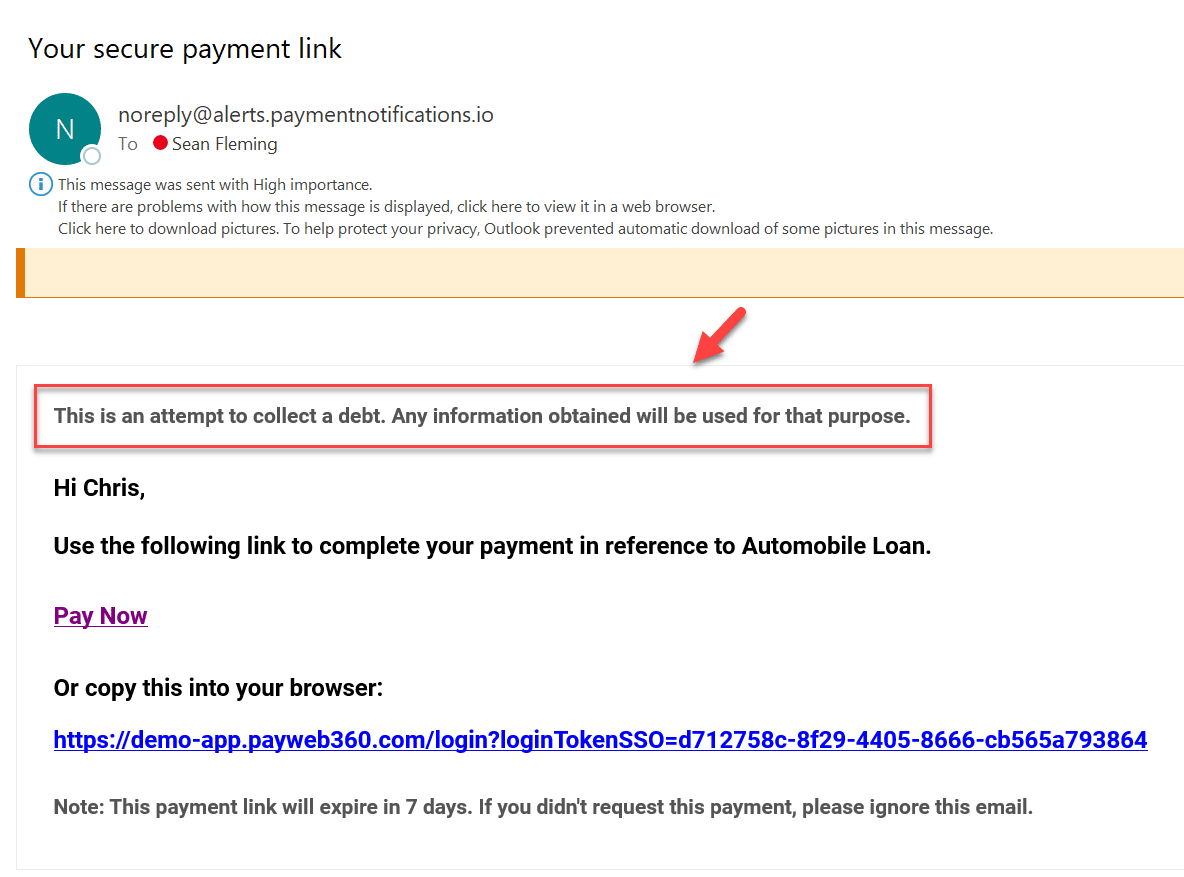
Portal Login
We fixed an issue causing login IDs to be truncated within our client-facing portal when they exceeded 20 characters in length. PaymentVision will now support login IDs up to 30 characters in length and will present an error message when attempting to save one that exceeds it.